Korea, Metro Navi6.0.90
Publisher Description


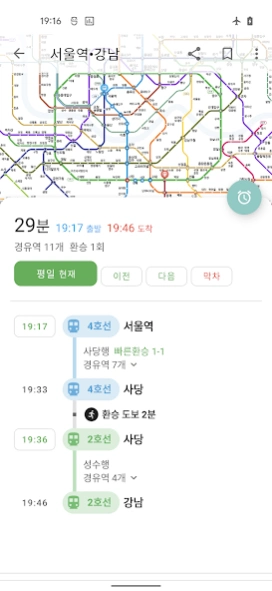
Provides information such as subway timetables and real-time subway locations
■ National subway route map image
We provide images so that you can see the subways in the metropolitan area (Seoul), Busan, Daegu, Daejeon, and Gwangju at a glance.
■ Subway timetable
You can easily view the subway station timetable.
■ Route search
If you specify the departure station, transit station, and arrival station, it will search for the fastest route.
■ Real-time subway location and arrival information (only supported lines)
You can check the locations of the subways in Seoul. You can also find out which subways will arrive at the station soon.
■ Subway station detailed information
It provides information such as subway station exit information, platform location, and restroom location.
About Korea, Metro Navi
The company that develops Korea, Metro Navi is Shining. The latest version released by its developer is 6.0.90.
To install Korea, Metro Navi on your Android device, just click the green Continue To App button above to start the installation process. The app is listed on our website since 2026-10-04 and was downloaded 11 times. We have already checked if the download link is safe, however for your own protection we recommend that you scan the downloaded app with your antivirus. Your antivirus may detect the Korea, Metro Navi as malware as malware if the download link to com.wooks.subway is broken.
How to install Korea, Metro Navi on your Android device:
- Click on the Continue To App button on our website. This will redirect you to Google Play.
- Once the Korea, Metro Navi is shown in the Google Play listing of your Android device, you can start its download and installation. Tap on the Install button located below the search bar and to the right of the app icon.
- A pop-up window with the permissions required by Korea, Metro Navi will be shown. Click on Accept to continue the process.
- Korea, Metro Navi will be downloaded onto your device, displaying a progress. Once the download completes, the installation will start and you'll get a notification after the installation is finished.
Version History
version 6.0.90
posted on 2026-10-04
Update timetable
version 6.0.89
posted on 2026-09-01
1. Update timetable
2. Ad library change
version 6.0.86
posted on 2026-06-03
1. Update timetable
2. Change ads lib
version 6.0.59
posted on 2024-12-29
Add GTX-A line
version 6.0.58
posted on 2024-12-23
1. Add Daegu Daegyeong Line
2. Add Daegu Line 1 extension area
3. Add real-time arrival information for Seoul Sillim Line
version 6.0.57
posted on 2024-12-19
1. Add Daegu Daegyeong Line
2. Add real-time arrival information for Seoul Sillim Line
version 6.0.51
posted on 2024-08-10
Apply to the extension section of Line 8
version 6.0.49
posted on 2024-06-28
Add GTX-A Guseong station
version 6.0.44
posted on 2024-01-11
Integration library update
version 6.0.42
posted on 2023-12-16
Applies to the opening of the Dongducheon-Yeoncheon section of Line 1
